

Stand Here: eye level, walk and zoom
Switch the camera toggle at the top right of the 3D view from Orbit to Stand Here to drop down onto the terrain at eye level (1.7 m above the ground). The land around you is rendered at true 1.0× scale and lowered for the curve of the Earth, so ridges sit at the same elevation angles you see in the field.
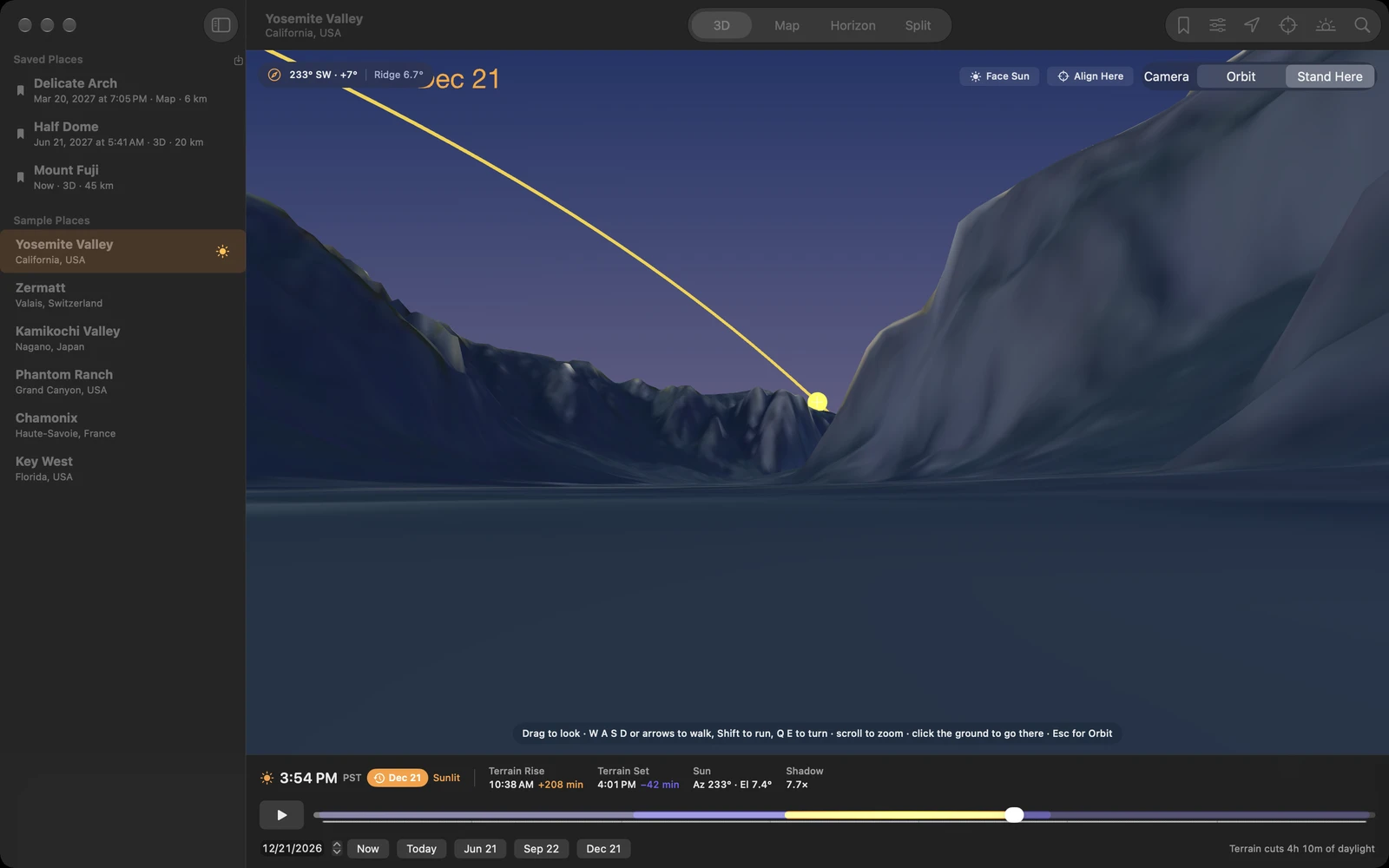
The Stand Here HUD
Section titled “The Stand Here HUD”Across the top of the 3D view in Stand Here mode:
- Direction and ridge readout (top left): shows your current heading in degrees and compass point (for example
228° SW), vertical pitch (+11°), andRidge X.X°— the exact terrain horizon elevation angle straight ahead. When zoomed in past1.0×, the zoom factor (such as3.2×) appears beside it; click or tap the zoom number to snap straight back to1×. - Face Sun: turns the camera straight toward the current sun position (or toward terrain sunrise if the sun is below the horizon).
- Align Here: opens Sun Alignment Finder pre-aimed at the exact azimuth and pitch you are currently looking at, so you can find every day of the coming year when the sun crosses that notch or peak.
Looking, zooming and walking
Section titled “Looking, zooming and walking”On iPhone and iPad
Section titled “On iPhone and iPad”- Look around: Drag in any direction. Looking slows down automatically as you zoom in so you can aim precisely at a distant summit.
- Binoculars zoom: Pinch to zoom from
1×up to12×. - Walk to a spot: Tap any point on the terrain to glide over there (available in terrain modes; in House (250 m) mode the camera stays fixed on the lot while you look and zoom).
- External keyboard: Works with the same walking keys as the Mac.
On the Mac
Section titled “On the Mac”| Action | Control |
|---|---|
| Look around | Drag with mouse or trackpad |
| Walk forward, back, strafe left / right | W, S, A, D or arrow keys |
| Run (6× faster — 90 m/s instead of 15 m/s) | Hold Shift while walking |
| Turn left / right | Q and E |
| Zoom in / out (1× to 12×) | Scroll wheel, trackpad pinch, or + / − (0 resets to 1×) |
| Move directly to a spot | Click on the ground |
| Return to Orbit view | Esc |
Moving updates the observer
Section titled “Moving updates the observer”Whenever you walk or tap/click to move to a new spot on the block, where you stop becomes the new observer position. Sun Terrain recalculates the 360° terrain horizon, sunrise/sunset times and cast shadows from that exact vantage point, and updates the place name when you pause.