

Sun Alignment Finder
Sun Alignment Finder searches the coming 365 days for every date and time when the sun crosses a target azimuth and elevation from your observer point, and tells you whether the sun clears the real terrain ridge in that direction.
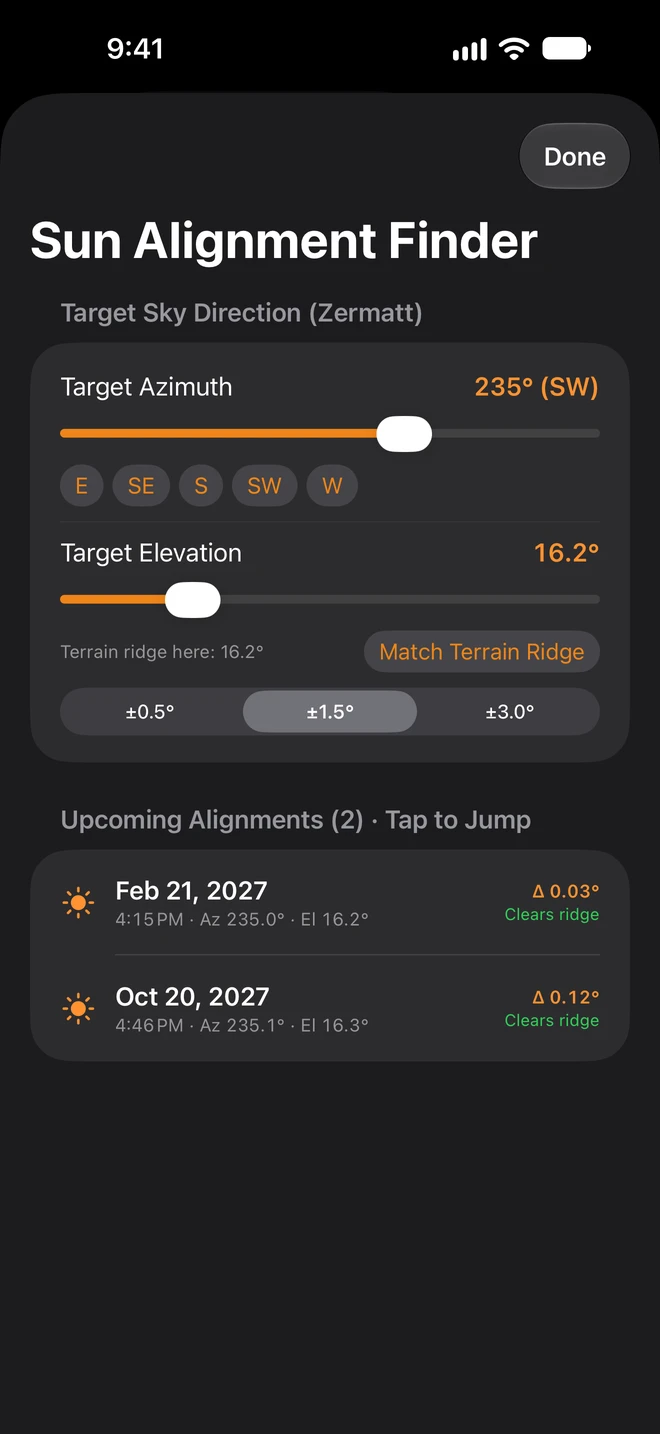
Two ways to aim
Section titled “Two ways to aim”- From Stand Here (easiest): Switch the 3D view to Stand Here, look directly at the peak, saddle or canyon notch you want (zoom in up to
12×to frame it precisely), and tap Align Here. Sun Alignment Finder opens pre-filled with that exact azimuth and pitch. - From the toolbar: Tap the target/crosshair icon in the toolbar (on iPhone, inside More). It opens aimed at the current sun azimuth and the terrain ridge elevation in that direction.
Controls
Section titled “Controls”- Target Azimuth (
0°–359°, step1°): Drag the slider or tap one of the five quick compass buttons (E, SE, S, SW, W). Tapping a quick compass button also snaps Target Elevation to the terrain ridge height at that bearing. - Target Elevation (
−3.0°–85.0°, step0.5°): Drag the slider or tap Match Terrain Ridge to snap straight toTerrain ridge here(the computed 360° horizon elevation at your chosen azimuth). Negative angles down to−3.0°support summits overlooking lower valleys or the sea. - Tolerance: Choose
±0.5°,±1.5°(default) or±3.0°. Tighter tolerance finds only razor-close crossings; wider tolerance catches nearby days when planning a multi-day trip.
Reading the results and jumping to a match
Section titled “Reading the results and jumping to a match”Matches update automatically as you move the sliders:
- Date and local time (in the place’s time zone), plus the exact solar
AzandElat closest approach. - Angular error (
Δ): How close the sun’s center passes to your target point in degrees. Clears ridge(green) vs.Behind ridge(gray): Compares the sun’s elevation against the computed terrain horizon at that azimuth, so you know immediately whether the alignment will actually be visible or hidden behind a nearer ridge.- Tap any match to close the sheet and jump the entire workspace (3D, Map, Horizon and Stand Here) straight to that exact date and minute.
If the sun never reaches that azimuth and elevation at the place’s latitude during the year (for example, due north at high elevation in the northern mid-latitudes), the list explains why and invites you to adjust azimuth or elevation.