
Resection
Resection finds where you are from what you can see. You read the azimuth to two or three known points, and where those lines cross is where you stand. It uses no GPS for the answer.
Open Tools ▸ Resection. The tool needs at least two marks; add them on Marks first.
Work a resection
Section titled “Work a resection”-
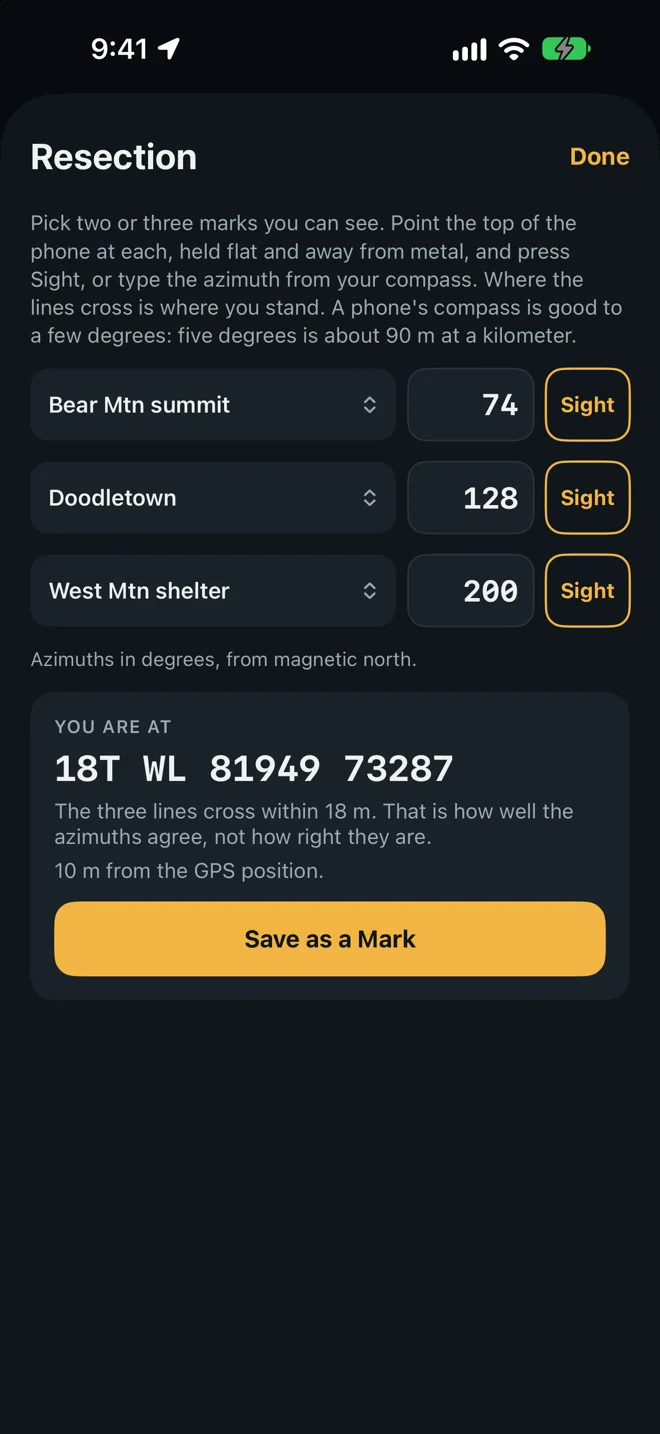
Pick the marks. In each row, tap Choose a mark and pick a mark you can see. Two rows are enough. The third row, Third mark (optional), checks the other two; choose None to clear it.
-
Give each its azimuth. Either:
- Point the top of the phone at the mark, held flat and away from metal, and tap Sight. The compass reading goes into the row.
- Or type the azimuth you read with a hand compass.
-
Read the answer. As soon as two rows are filled, the card You are at shows the grid where the lines cross.
-
Keep it. Tap Save as a Mark to open New mark at that grid.
The line under the rows says what the fields expect, such as Azimuths in degrees, from grid north. Both follow Settings: degrees or mils, and grid, magnetic or true north. Type what your compass reads only if Settings match it. A hand compass reads magnetic north.
What the card says
Section titled “What the card says”- The grid where you are.
- With three marks: The three lines cross within a distance. Three lines rarely meet in a point; they make a small triangle, and this is its size. It tells you how well the azimuths agree, not how right they are.
- When the phone has a position: how far the answer is from the GPS position. Use it as a check in either direction.
If the card is replaced by Those lines do not cross in front of the marks., the azimuths describe no place: every mark has to lie ahead along its own line. Check the numbers, and that they are from the north the message names.
Sight and the three norths
Section titled “Sight and the three norths”Sight gives the reading from the north in Settings when it can. A grid reading needs your position, because the angle between grid and true north depends on where you stand. With no position the reading stays true or magnetic, and a small label under the number says which. Typing in a row clears the label: a typed number is taken as being from the north in Settings.
Sight is gray when the phone has no compass reading.
Magnetic azimuths need the phone to know the declination. It learns that the first time its compass runs with a position. See Grid, magnetic and true north.
Near a grid zone edge
Section titled “Near a grid zone edge”A grid azimuth is measured from the grid of the zone you stand in. Near the edge between two zones, the same typed numbers can fit one place in each zone. The tool does not guess. It says:
These grid azimuths fit more than one place, one in each grid zone, because a grid azimuth is measured from the grid of the zone you stand in. Pick the zone your map sheet is in.
Under it is one card for each zone, labeled If you are in zone 18 with its grid, and a button My map is in zone 18 (with that zone’s number). Tap the button for the zone printed in your map’s margin.
The answer then carries the line Grid azimuths read in zone 18. Tap Change beside it to choose again.
This only happens with typed grid azimuths. A Sight taken with a position remembers the zone you stood in, and true and magnetic azimuths do not depend on the zone.