

Workouts from Apple Health
GPX Explore opens the workouts in Apple Health that have a route: rides, runs, walks and hikes recorded outdoors with an Apple Watch, an iPhone, or any app that saves its routes to Apple Health. Each one opens on the map like a GPX file, with its heart rate, cadence and power on the chart, and saves as a GPX file for Strava, Garmin Connect, Komoot or any other app. It is free, on iPhone and iPad; fixing a workout once it is open needs GPX Explore Pro, as for any file.
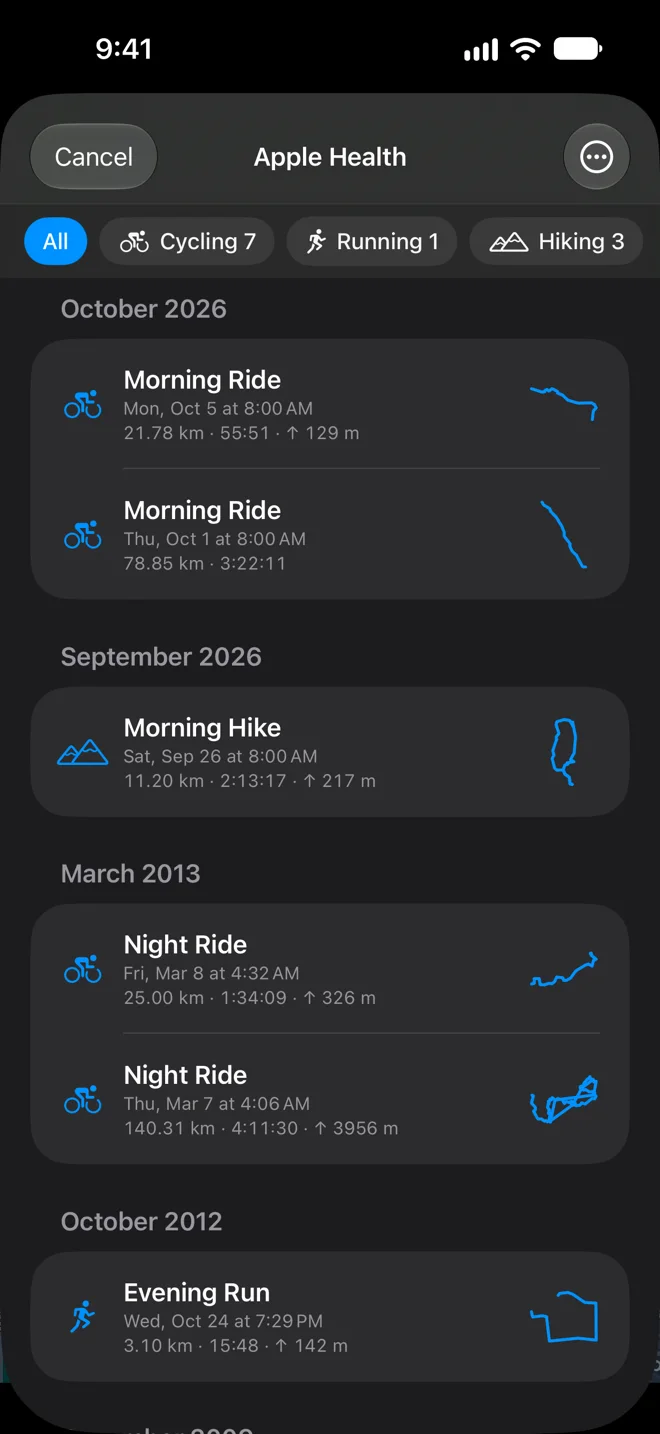
Open a workout
Section titled “Open a workout”-
Tap From Apple Health on the start screen, or choose From Apple Health… in the Files menu over the map.
-
The first time, tap Connect to Apple Health and allow GPX Explore to read your workouts. It reads workouts and their routes, heart rate, cadence and power, and nothing else.
-
Tap a workout. It opens on the map as a new document named like “2026-10-05 Morning Ride”, with everything a GPX file would show: the route card, the splits and the chart.
The list is grouped by month, newest first. Each row has the activity, its date, distance, moving time and climb, the app that recorded it, and an outline of the route. The buttons at the top filter by activity. Workouts without a route (indoor rides, treadmill runs) are hidden; Show Workouts Without a Route in the More menu lists them too, marked No route.
Save as GPX files
Section titled “Save as GPX files”Tap Select Workouts in the More menu, choose one or more, then Save to Files… to put the GPX files in a folder you pick, or Share. One workout at a time can also be opened and saved from the map like any other file.
Each file is the same as WorkoutGPX writes: the route with its times and heights, heart rate, cadence and power on each point (Garmin’s TrackPointExtension, which Strava and Garmin Connect read), and a description with the totals. A workout recorded in parts (paused, or across a pause in GPS) keeps one segment per part.
Workouts sent from WorkoutGPX open in GPX Explore in one tap too, and are kept as files in GPX Explore’s folder.