

Line of sight
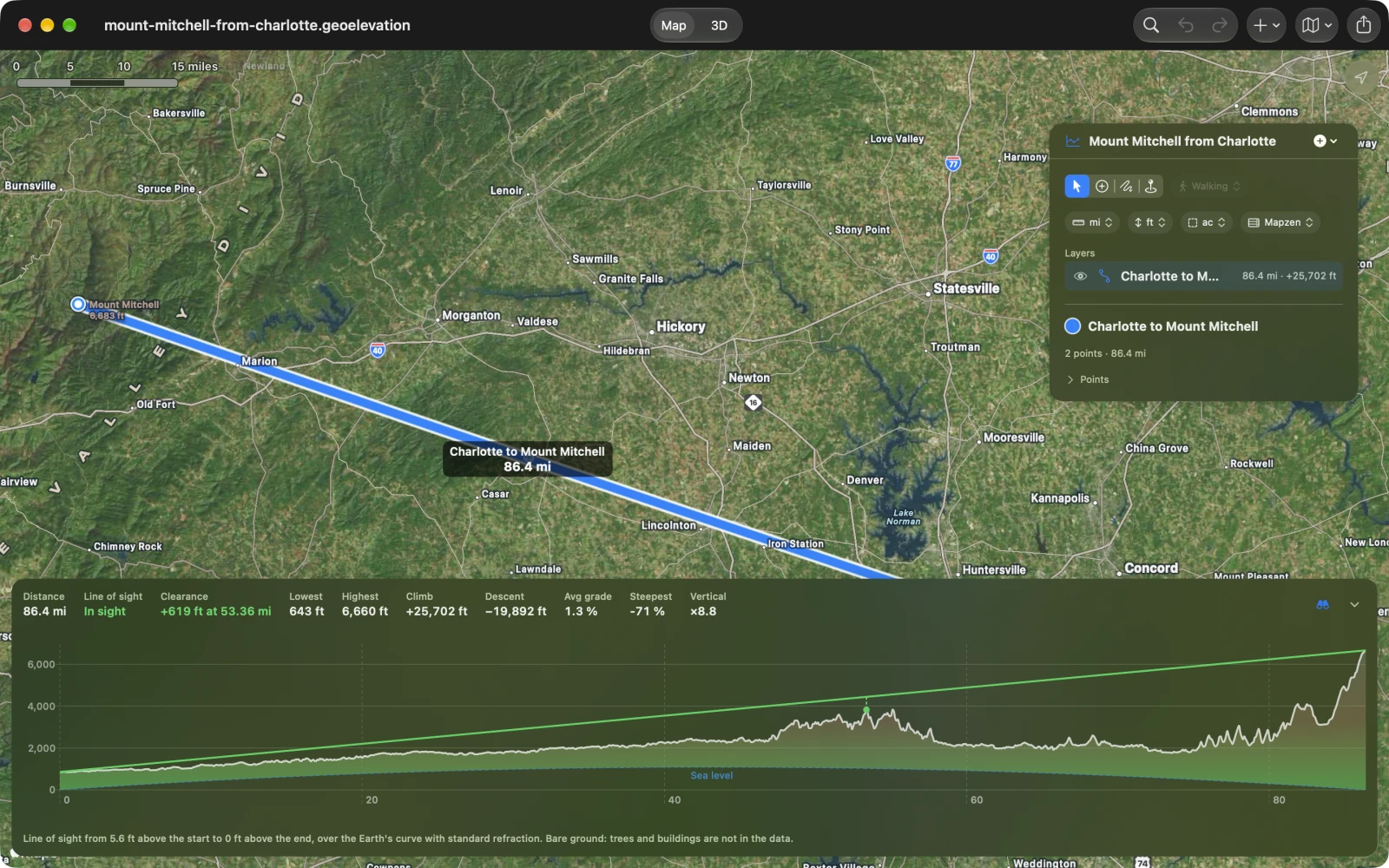
Can Mount Mitchell be seen from the high ground near Charlotte, 86 miles away? The profile alone cannot say: it draws the ground along a flat baseline, and over that distance the Earth drops away thousands of feet. Line of Sight draws the ground over the curve, with the line from your eye to the far end.
Switch it on
Section titled “Switch it on”-
Draw a straight path of two points: where you stand, then what you look at. Keep Straight chosen beside the tools, not Walking, Cycling or Driving. For exact ends, use Add Point at Coordinates….
-
Choose the binoculars beside the profile’s numbers: above the chart on iPad and Mac, in the card on iPhone. On the Mac, View ▸ Line of Sight also switches it on and off.
-
Switch on Line of Sight and set the two heights:
- Eye above the start: 1.7 meters (5.6 feet) for a person standing; more for a tower or a roof.
- Height at the end: 0 for the ground itself; more for a mast, a building or a summit cairn.
The heights are typed in the document’s elevation unit, from 0 up to 10,000 meters, and are saved with the path, so the file opens with its line of sight on. Each change is a step you can undo.
On a path with more than two points, or with legs that follow trails or roads, the switch is dimmed and the popover says why: a line of sight runs between the two ends of a straight path.
Reading the chart
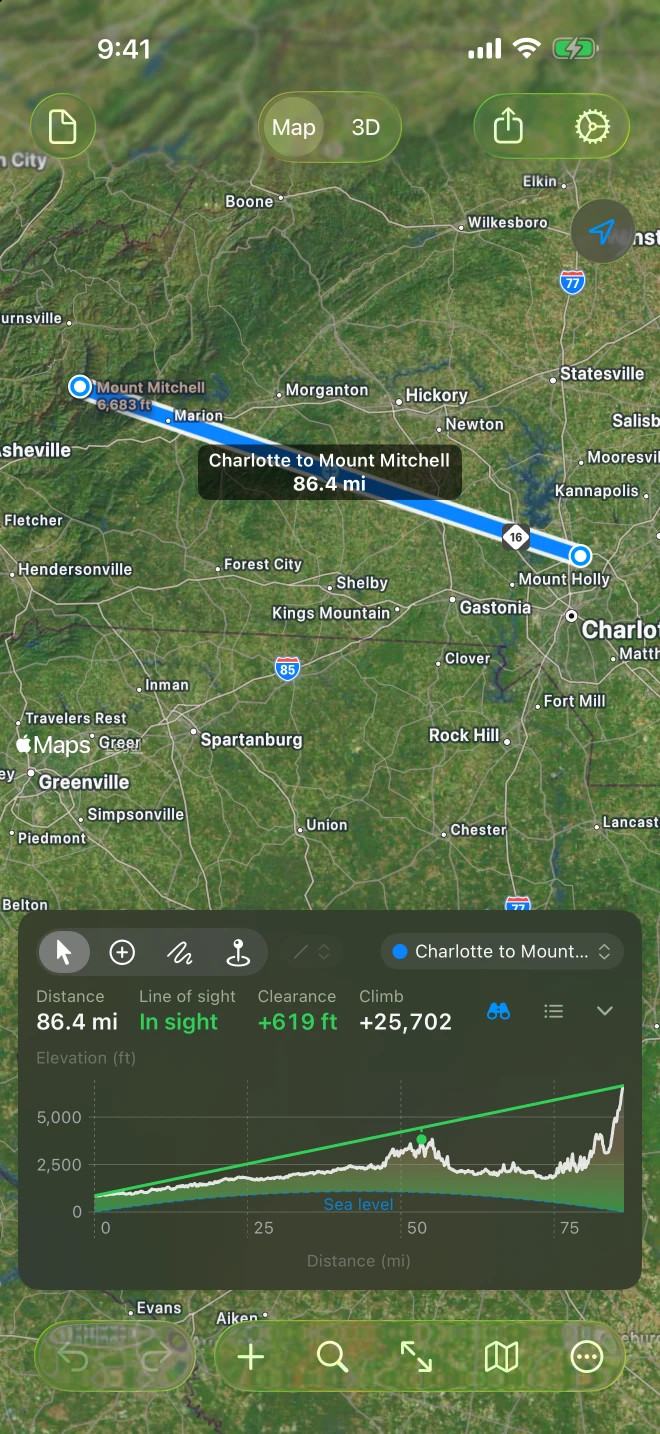
Section titled “Reading the chart”- The ground is drawn lifted by the Earth’s bulge between the two ends, and sea level becomes the dashed arc under it.
- The line runs straight from your eye to the top of the far end: green when it clears the ground all the way, orange once the ground is in the way, gray when the data cannot say.
- A dot marks the tight spot, the ground that comes closest to the line as both ends see it, with a dashed tick up to the line.
- Line of sight above the chart says In sight, Out of sight or Can’t tell, and Clearance says how far the line passes above the tight spot, or with a minus sign how far the ground rises into it, and where. On iPhone the card gives the clearance alone; the dot shows where.
- Move along the chart and the readout adds the clearance at that point, while the ring on the map shows where it is.
- On iPad and Mac a note under the chart repeats the two heights.
When the answer is decided by less than 5 meters (16 feet) either way, a note under the chart calls it a close call: inside the elevation data’s margin of error.
Can’t tell
Section titled “Can’t tell”The line turns gray and Why gives the reason:
- Gaps in the data: some samples along the line have no height, and nothing that was measured blocks the line.
- Checking sea or land…: some of the ground is below sea level and Geo Elevation is finding out whether it is sea (see below). It takes a moment.
- Sea or land unknown: that check could not be made. It needs an internet connection; Geo Elevation tries again by itself.
Below sea level: sea or land
Section titled “Below sea level: sea or land”Mapzen, the elevation data that includes the sea floor, gives the seabed and dry land below sea level alike as negative heights: the ocean floor off a coast, but also Death Valley and the Dead Sea shore. Geo Elevation looks those samples up in OpenStreetMap’s coastline. Where it is sea, the line passes over the water’s surface (the ocean at sea level, the Caspian Sea at its own level), not over the sea floor; everywhere else the ground counts as land. Until the answer comes back, the low samples are drawn as sea and the verdict waits. With ASTER, which covers land only, every height is land.
The chart credits “Coastline © OpenStreetMap contributors” whenever it draws sea. The same check runs for every profile, line of sight or not; see The elevation profile.
How it is worked out
Section titled “How it is worked out”- The Earth’s bulge between two points at distances a and b from the ends is a·b ÷ 2R′, where R′ is the Earth’s radius stretched for standard refraction (k = 0.13): light bends a little with the curve. Both ends keep their true heights; the middle of a 140 km line rises about 330 meters.
- The tight spot is judged by angle as both ends see it, not by meters: the smallest clearance in meters is nearly always the ground at your feet, just under your eye.
- The ground is bare. The heights are the elevation data’s, one every 30 meters; trees and buildings are not in it. A clearance of a few meters over a forest is no clearance. See Accuracy and the data.
On paper
Section titled “On paper”Print… and the PDF report draw the line on the profile and add Line of sight, Clearance, Eye above the start and Height at the end to the numbers. A close call says so (“In sight, a close call”).