

Settings
Open Settings with the gear at the top right of the Record tab, or with Settings in the toolbar of an open track. Every setting takes effect at once, in a recording that is running too.
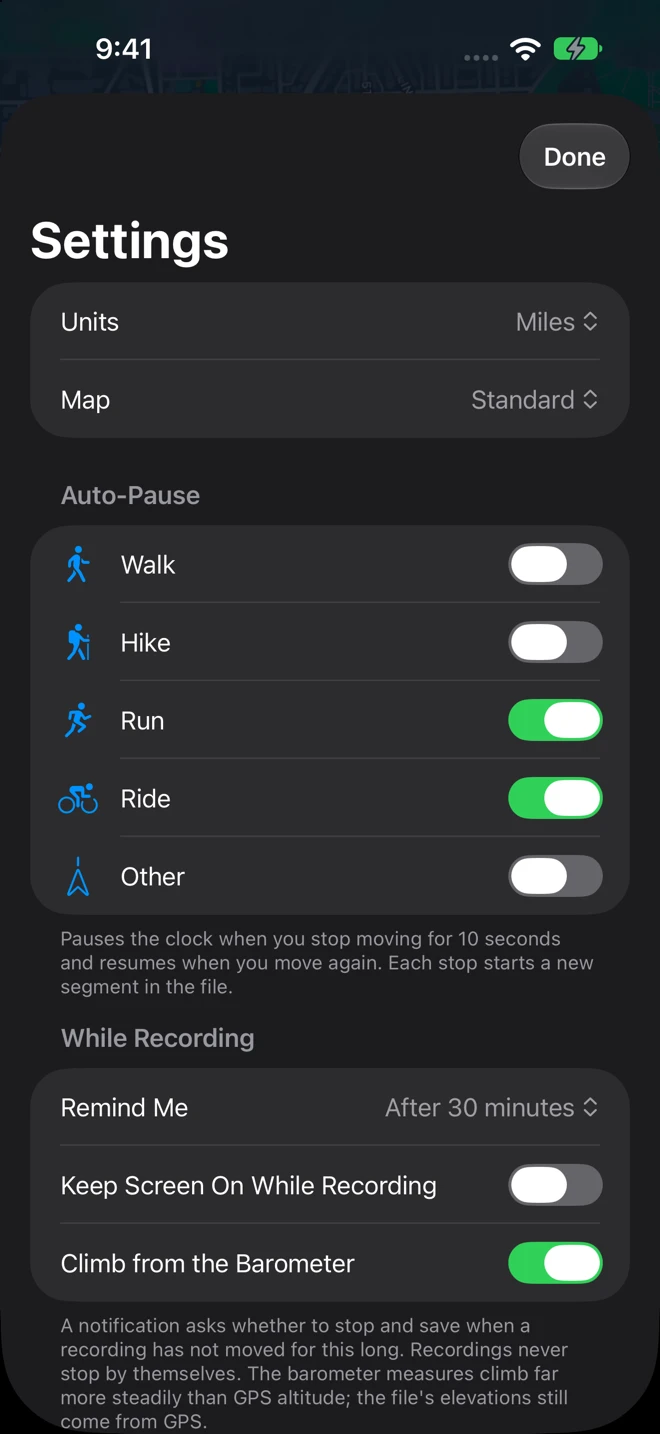
| Section | Setting | What it does |
|---|---|---|
| Units | Kilometres (and meters) or Miles (and feet), everywhere: the recording screen, the list, the splits, the chart. Until you change it, it follows your region. | |
| Map | Standard, Satellite or Hybrid, for the recording map and the viewer. | |
| Auto-Pause | Walk, Hike, Run, Ride, Other | On, a recording of that activity pauses by itself after ten seconds without moving and resumes when you move again; each stop starts a new segment in the file. Off by default. See Record a track. |
| While Recording | Remind Me | Off, After 15 minutes, After 30 minutes (the default), After 1 hour or After 2 hours: the notification that asks whether to stop and save when a recording has not moved for that long. Recordings never stop by themselves. See the reminder. |
| While Recording | Keep Screen On While Recording | Off by default. On, the display stays lit while the recording screen shows. |
| While Recording | Climb from the Barometer | On by default. The climb and descent come from the iPhone’s barometer, which measures height changes far more steadily than GPS; the file’s heights still come from GPS. Off, or on a device without a barometer, they come from the GPS heights. See Accuracy. |
| iCloud Drive | Copy Tracks to iCloud Drive | On by default when iCloud Drive is on for Geo Tracker. Each track is saved on the device first, then copied to iCloud Drive ▸ Geo Tracker as a plain GPX file (with its photos) that a Mac opens. The section is absent when iCloud Drive is off. |
| iCloud Drive | Restore from iCloud Drive | Brings back tracks that are in iCloud Drive and not on this device, on a new iPhone. It reports how many it restored, or Every track in iCloud Drive is already on this device. |
| Viewer | Track Colours | Effort colors the line by the grade: steep climbs red, descents blue. Gradient colors it by height, low in blue to high in red. |
| Viewer | Line Width | The thickness of the track in the viewer, 2 to 10. |
| Viewer | Show Elevation Chart | Whether the profile is open when a track opens. |
| Viewer | Show Route Card | Whether the route card is open when a track opens. |
Also from ObjectGraph
Section titled “Also from ObjectGraph”The next section lists our other apps, each with what it does; tap one to see its App Store page over Geo Tracker. GPX Explore edits these recordings: trim, fix and join them, with every climb found and rated, and rides any route turn by turn. WorkoutGPX turns Apple Watch workouts into GPX files. Geo Elevation draws a trail and shows its profile, or an area and its slopes and contours in 3D. Geo Measure measures any area or distance on a map.
The version, the privacy policy and Geo Tracker’s page on objectgraph.com, under a line that says where your routes are: on this device, as GPX files, in the Geo Tracker folder in Files. No account, no tracking, nothing uploaded.