
Balloons and the inspector
The inspector is the panel on the right of the window (on iPhone, a sheet). It opens by itself when you select something, and the Inspector button at the right of the toolbar (on the Mac also Map ▸ Inspector, ⌥⌘I) shows or hides it. With nothing selected it says Nothing Selected.
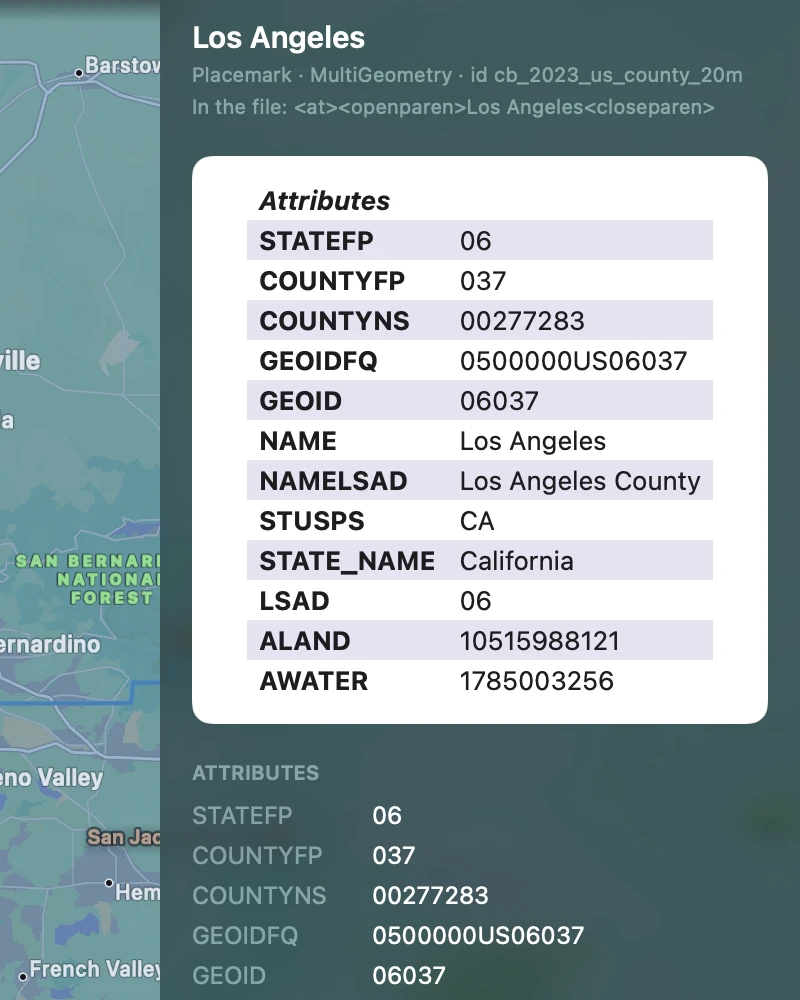
From the top:
- The name, then a line with what it is in KML terms (Placemark · Polygon, Folder, GroundOverlay) and its
id. Some converters leave names encoded: the Census Bureau’s files write Alabama as
<at><openparen>Alabama<closeparen>. KML Explore shows “Alabama” everywhere, and the inspector adds In the file: with the text as written. - The balloon (see below).
- Attributes: every attribute of the placemark, by its schema’s display name where the file gives one. Values can be selected and copied.
- Time: When for a time stamp, Begins and Ends for a span, as the file writes them.
- Style, for a placemark: the Shared style it uses, then for an area Fill and Outline, for a path Line, for a place Icon, Icon color and Icon scale. Colors are in #RRGGBB, with their opacity and line width; point at one on the Mac for the color as KML writes it (alpha, blue, green, red). Default means the file sets none; None that the fill or outline is turned off.
- Position, for a place: in your coordinate format first, then decimal degrees, degrees, minutes and seconds, UTM and MGRS, and the Altitude with its altitude mode. Each can be selected and copied.
Areas, lengths and perimeters are on the card over the map.
The balloon
Section titled “The balloon”The balloon is what Google Earth would show when you click the placemark, on a white card as Google Earth draws it:
- A BalloonStyle template, with its entities filled in:
$[name],$[description],$[Snippet],$[address],$[id], and the attributes as$[field],$[field/displayName]or$[schema/field]. - Otherwise the description, as HTML when it is HTML, as text with its line breaks when it is plain.
Pictures inside a KMZ show at once; pictures on the web wait for Load (see Images from the web). Links open in your browser. Scripts never run.
While editing, the inspector becomes fields: see Names, attributes and styles.